-
Jump to
- September 24
- Bug Fixes
- September 17
- Bug Fixes
- September 10
- Bug Fixes
- September 3
- Feature Releases
- Quality Improvements
- Bug Fixes
September 24th, 2025
We released fixes for the following:
- Language filter in the manager content search screen would only show the top 10 languages.
- Resetting course progress does not reset progress in SCORM packages.
- Learners not being directed to /openId/logout Path when signing out of a panorama configured with OIDC.
September 17th, 2025
We released fixes for the following:
- Deleting a sublicense via API does not re-parent child licenses.
- Authors are still displayed in the calatlog widget list view even if display content authors flag is set to false.
- Auto assignment rules that do not match any users are applied to all users.
September 10th, 2025
We released fixes for the following:
- Questions in quizes in cloned courses are not syncing to NRT BI.
- Improve the duplicate tag error message to note that folders and tags share the same name space.
September 3rd, 2025
ACCESS MAPPING
Require a Code for Learner Registration
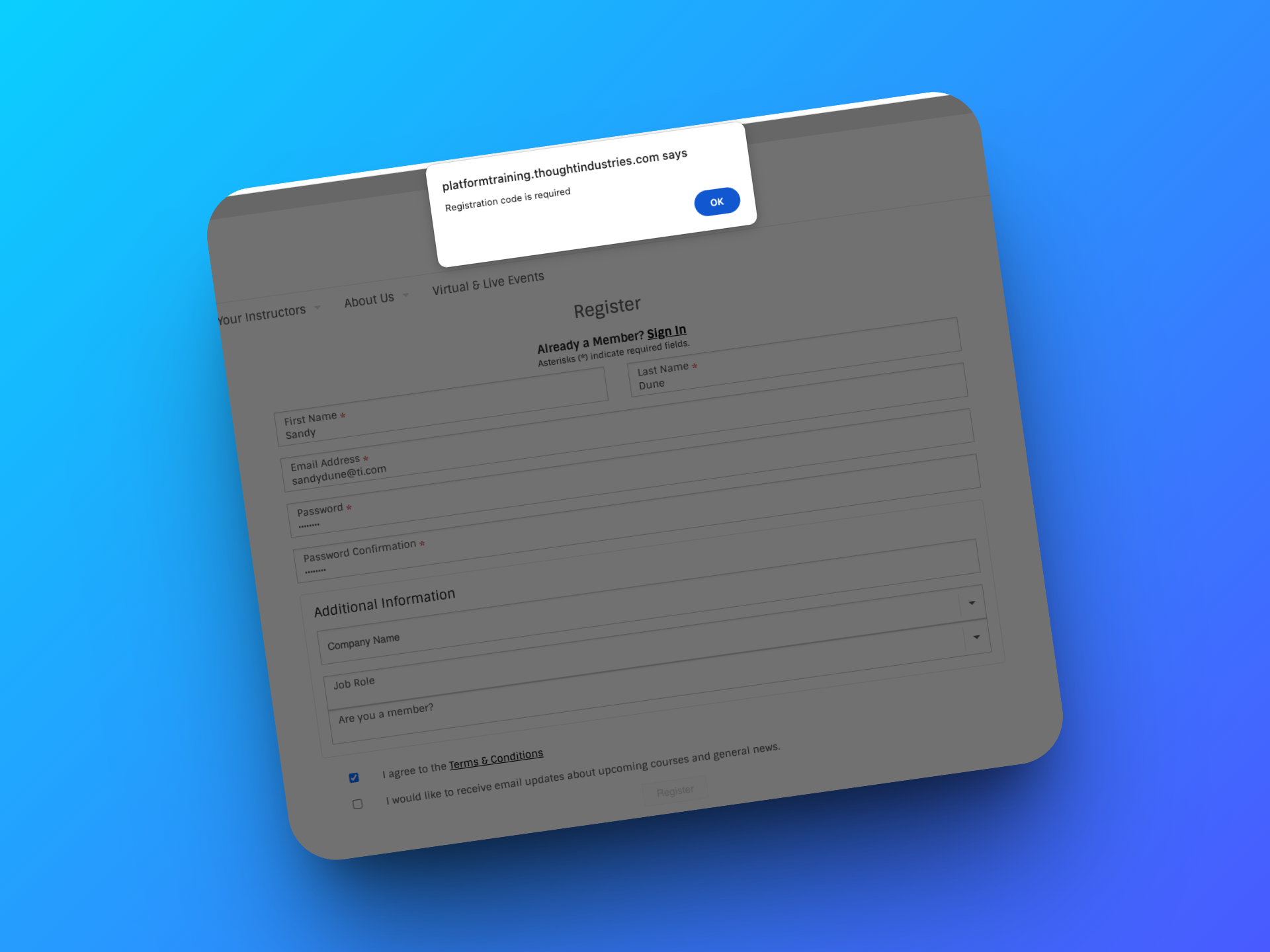
With Learner Registration Requires Code, you gain more control over who can access your learning site. When enabled, new users must enter a valid code to create an account, even during checkout. Without a code, they can’t register or purchase content, ensuring only invited learners, employees, or partners can access your site. Existing learners are unaffected and continue accessing content as usual.
This feature is especially useful if your site is meant for a closed audience or you want an extra layer of security. Codes can be distributed in whatever way works best for your organization, sent individually, shared in bulk, or automated through your systems. You can even translate the error message shown to learners who try to register without a code, helping keep the experience consistent with your brand and communication style.
The Require a Code for Learner Registration option is behind a feature flag.
Contact Support to have it enabled.
To read more about this feature, see this article.
We released the following quality improvements:
Sleeker Coupon Setup Experience
The Create New Coupon page has received a sleek visual update at /learn/manager/global-coupon/new. While no functionality has changed, the cleaner design makes it easier to set up coupons with confidence and speed, giving admins a smoother experience when creating discounts for learners.
Go check it out, you won't be disappointed!
Enhanced Grading Filters
You can now select multiple fields at once using the filters at the top of the grading page, making it faster and easier to zero in on exactly the learners or data you need.
Smarter Admin Search Tips
We’ve added an in-platform prompt with helpful tips to make admin searches easier.
Many users weren’t aware of tricks like using an asterisk for partial strings, so we’ve brought this highly upvoted suggestion from Community directly into the platform, making it faster and simpler to find the users and content you need!
We released fixes for the following:
- SSO: Account Logout Redirects Not Working When Customer Has Main Site and Panorama SSO Configured At The Same Time
- If the Reset Progress API endpoint is used with the Erase Transcript option and a new completion is granted, subsequent certificates can still show the original completion date