-
Jump to
- January 28
- Accessibility Improvements
- Quality Improvements
- Bug Fixes
- January 22
- Feature Releases
- Quality Improvements
- Bug Fixes
- January 14
- Quality Improvements
- Bug Fixes
- January 7
- Feature Releases
- Quality Improvements
- Bug Fixes
January 28th, 2026
📣 From the CPO
Sarah Phoenix, our new Chief Product Officer, outlines the significance of this release and how it aligns with our evolving product vision.
This release continues our focus on improving accessibility, reliability, and predictability across the platform—particularly in areas that support learner access and high-stakes operational workflows.
Read More Here ↓
Accessibility Improvements
On accessibility, we’re delivering targeted improvements to the learner experience that make key interactions clearer and more usable for learners who rely on assistive technologies. These updates improve screen reader announcements, keyboard navigation, and search feedback within the learner dashboard, helping ensure learners can more easily discover and access content regardless of how they navigate the platform.
Bug Fixes
In addition, this release includes a set of focused bug fixes that improve the stability and correctness of core workflows such as events, ecommerce, media playback, and API integrations.
In Summary
Together, these updates strengthen trust in the platform—making learning experiences more inclusive for end users while helping teams run complex programs with fewer surprises.
We released the following Accessibility improvements:
We’re continuing to improve accessibility across the platform to ensure a more inclusive and usable experience for all learners and admins, including those who rely on assistive technologies. This release includes a set of focused accessibility enhancements that address usability gaps identified through internal audits and user feedback.
Accessibility updates include:
Improved screen reader support for learner access widget
Users who rely on assistive technologies will now receive proper expansion/collapse state announcements when interacting with accordion elements beneath tab components.
Clearer pagination announcements in the learner catalog
Pagination controls on the learner dashboard now use descriptive labels (e.g., “first page” and “last page”) instead of generic icons, improving clarity for screen reader users when navigating large catalogs.
Visible keyboard focus for catalog search
The catalog search field now displays a clear visual focus state when navigated via keyboard, making it easier for users who rely on keyboard navigation to understand where focus is placed.
Search results announcements for assistive technologies
Screen reader users are now notified when catalog search results update, including when a search returns zero results, improving awareness and reducing confusion during search interactions.
Improved screen reader support for learner access widgets
When learner access widgets are expandable or collapsible, screen readers now announce the correct expanded or collapsed state and better associate controls with the widget’s title, making interactions more understandable.
We released the following quality improvements:
Google Analytics Implementation
We’ve also configured Google Analytics for internal TI use to help us improve platform performance and the customer experience. For details, please refer to the pre-announcement email sent by our Scaled Success team in December.
We released fixes for the following:
- List Content API - filter by `sku` does not return LPs
- Coupon does not carry over to checkout confirmation page after switch to New Ecommerce (Global / Gateway)
- Videos not playing automatically when pre-roll and post-roll videos included
- Event-based courses are accessible before their access start date
- Assigning a dual role instructor to an event with all seats occupied is no longer working
- Graphical Issue with the Purchase Widget when Credit Amount is set up
- Display of timezones is inconsistent between the Event Creation Wizard and the manager course events tab
January 22nd, 2026
📣 From the CPO
Sarah Phoenix, our new Chief Product Officer, shares why this release matters and how it reflects our product vision moving forward.
This release continues our focus on strengthening the foundations that support scale, reliability, and modern learning experiences, particularly for customers operating complex environments, building custom experiences, or serving diverse learner audiences.
Read More Here ↓
Panorama Reporting Improvements
This release improves content actions reporting for Panorama admins who have visibility across all licenses by ensuring a more complete set of learner activity is included in Panorama reports. Content action records that were previously excluded when they were not explicitly attributed to a license are now surfaced appropriately for qualified admins, making Panorama reporting more reliable and easier to interpret at scale.
While this update is currently limited to content actions reports, it reflects ongoing work to improve reporting accuracy and transparency within Panorama environments, with additional Panorama and reporting enhancements planned in future releases.
Stronger Foundations for Custom and Scaled Experiences
Helium 3.0 delivers meaningful improvements for teams building custom learning experiences, including faster performance, improved security, and a more maintainable development foundation, allowing developers to work with less repetitive configuration, catch bugs earlier with better error messages, and benefit from automated security updates in core dependencies. These updates help reduce operational risk and make it easier for technical teams to iterate confidently as programs evolve.
More Inclusive, Usable Learner Experiences
This release includes targeted improvements to the learner experience, particularly in environments with multiple licenses and audiences. Updates to the learner sublicense selector make navigation faster and more intuitive in Panorama deployments.
INTEGRATIONS
Helium 3.0
Helium 3.0 is a major update to our headless architecture that strengthens the foundation teams rely on to build fast, secure, and reliable learning experiences. This release focuses on improving performance, hardening security, and simplifying day-to-day development so teams can move faster with greater confidence.
With Helium 3.0, headless implementations benefit from faster iteration during development, more efficient server-side rendering in production, and a more secure, future-proof dependency stack. Improvements to configuration patterns and tooling also reduce operational risk and make headless projects easier to maintain over time.
What's Included in Helium 3.0
For teams building on Helium, this release includes several meaningful technical improvements:
- Modernized build tooling: Upgraded to Vike (formerly vite-plugin-ssr) and Vite 5 for faster builds and improved Hot Module Replacement (HMR).
- Performance optimizations: Server-side rendering now caches the manifest at startup, and improved Apollo Client cleanup helps prevent memory leaks and improve response times.
- Security updates: Core dependencies – including GraphQL, universal-cookie, Apollo Client, and others – have been updated to address known vulnerabilities.
- Improved developer experience: A centralized configuration pattern (createVikeConfig()) reduces boilerplate, prevents common misconfiguration issues, and improves error messaging.
- Reliability and tooling: More stable initialization and updated development tools, including Storybook 8 and i18next upgrades, improve everyday development workflows.
Note
Helium 3.0 requires a small migration, including updates to import statements, vite.config.ts, and package dependencies. Please review the Migration Guide and Summary of Changes in the developer documentation before upgrading.
PANORAMA
Panorama Content Actions Reports Improvement
Accurate reporting is essential for Panorama admins who need to understand learner behavior, demonstrate outcomes, and make informed decisions across large, multi-license environments. This release improves the reliability and completeness of Panorama-level content actions reporting for admins who have visibility across all licenses in their Panorama.
With this update, Panorama admins who have the Viewing Licenses permission will now see a more complete report of content actions records in Panorama reporting, including learner actions that were previously excluded because they were not attributed to a specific license. This brings Panorama-level content actions reports into closer alignment with what’s visible when viewing the same data from the main site, making it easier to trust reporting outputs and use them confidently for analysis and stakeholder communication.
This improvement applies specifically to Panorama admins with access to all licenses and is currently limited to content actions reports. Admins with access to only a subset of licenses will continue to see reporting scoped to the licenses they’re provisioned for, consistent with existing permission models.
Note
The new version of the report allows filtering by license ID now and filtering by license name is coming shortly.
This release represents an early step in two broader areas of investment this year: expanded Panorama management capabilities and continued improvements to reporting accuracy, transparency, and usability. Additional enhancements are planned as we build on this foundation.
We released the following quality improvements:
Site Builder just got faster and easier to use
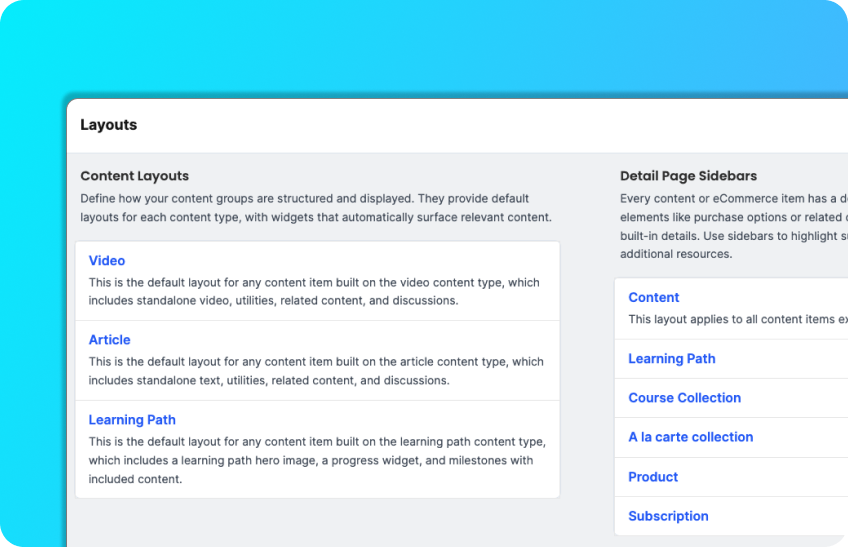
We've redesigned the Pages & Layouts experience around what matters most: getting things done quickly. Preview any page in one click, clone custom pages instantly, and jump straight to settings—all without hunting through menus.
You’ll also notice clearer organization. Standard Pages, Custom Pages, and Layouts now appear in separate sections.
For teams prioritizing accessibility, we’ve added full keyboard navigation, screen reader support, and helpful tooltips throughout.
Improved Learner License Selection
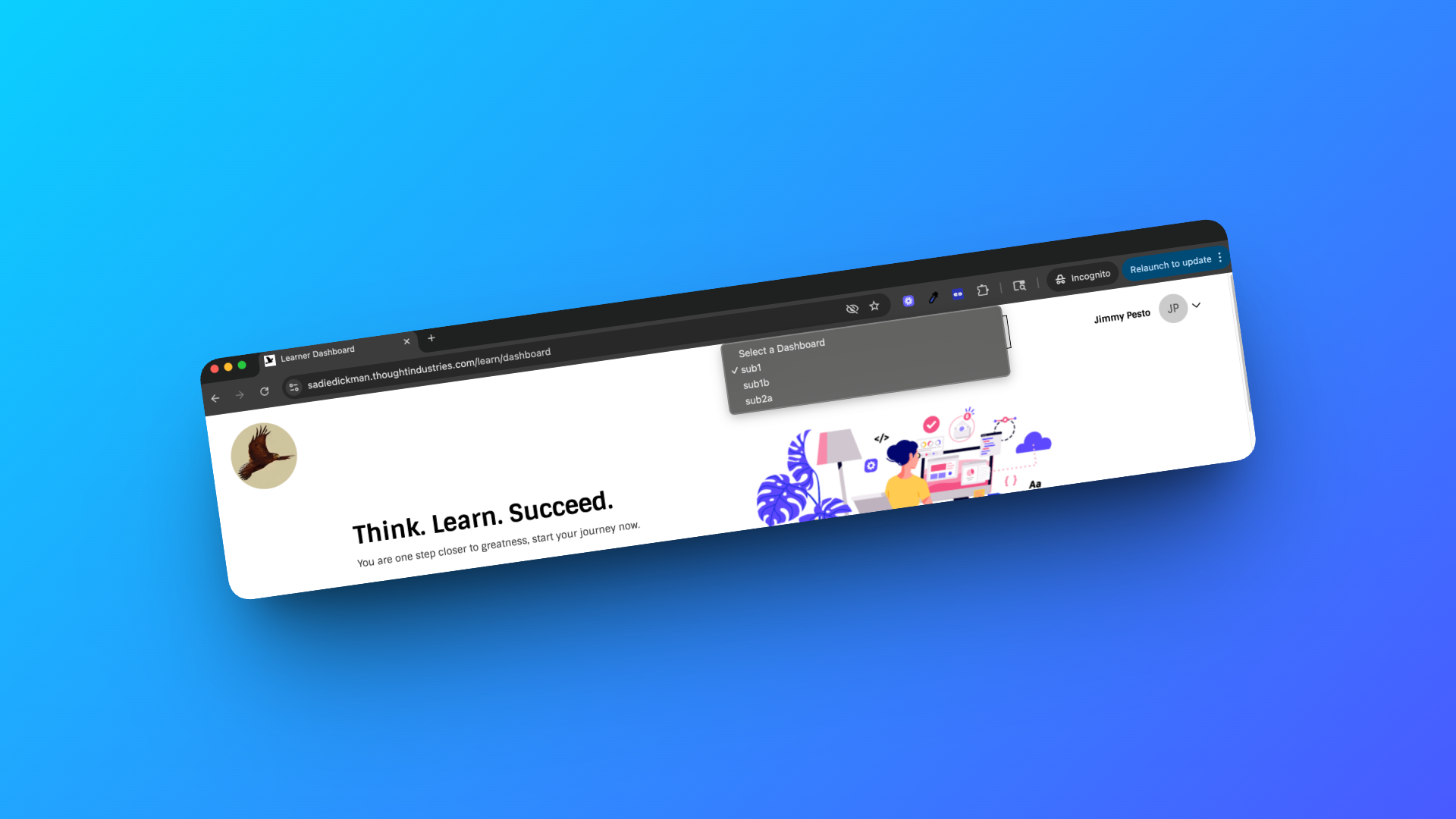
When Panorama License Separation is enabled, the learner dashboard now includes an updated sublicense selector with built-in search and type-ahead. This improvement enhances the learner experience by making it faster and easier to switch between licenses, especially in Panoramas with many sublicenses, and better supports scaled Panorama deployments.
We released fixes for the following:
- Special Characters not appearing correctly on Helium Dashboard
- Content inconsistently displays tab names across content types
- Unable to remove "Thought Industries" from Terms & Conditions checkout message under Translations when Ecomm 2.0 enabled
January 14th, 2026
📣 From the CPO
Sarah Phoenix, our new Chief Product Officer, shares why this release matters and how it reflects our product vision moving forward.
This release continues our focus on strengthening the platform foundations our customers rely on as your learning programs scale, particularly in data transparency and governance, ecommerce flexibility, and platform extensibility. Several of these updates represent early steps in larger initiatives we’ll continue to build on in the coming quarters.
We released the following quality improvements:
Bulk Update Prices API
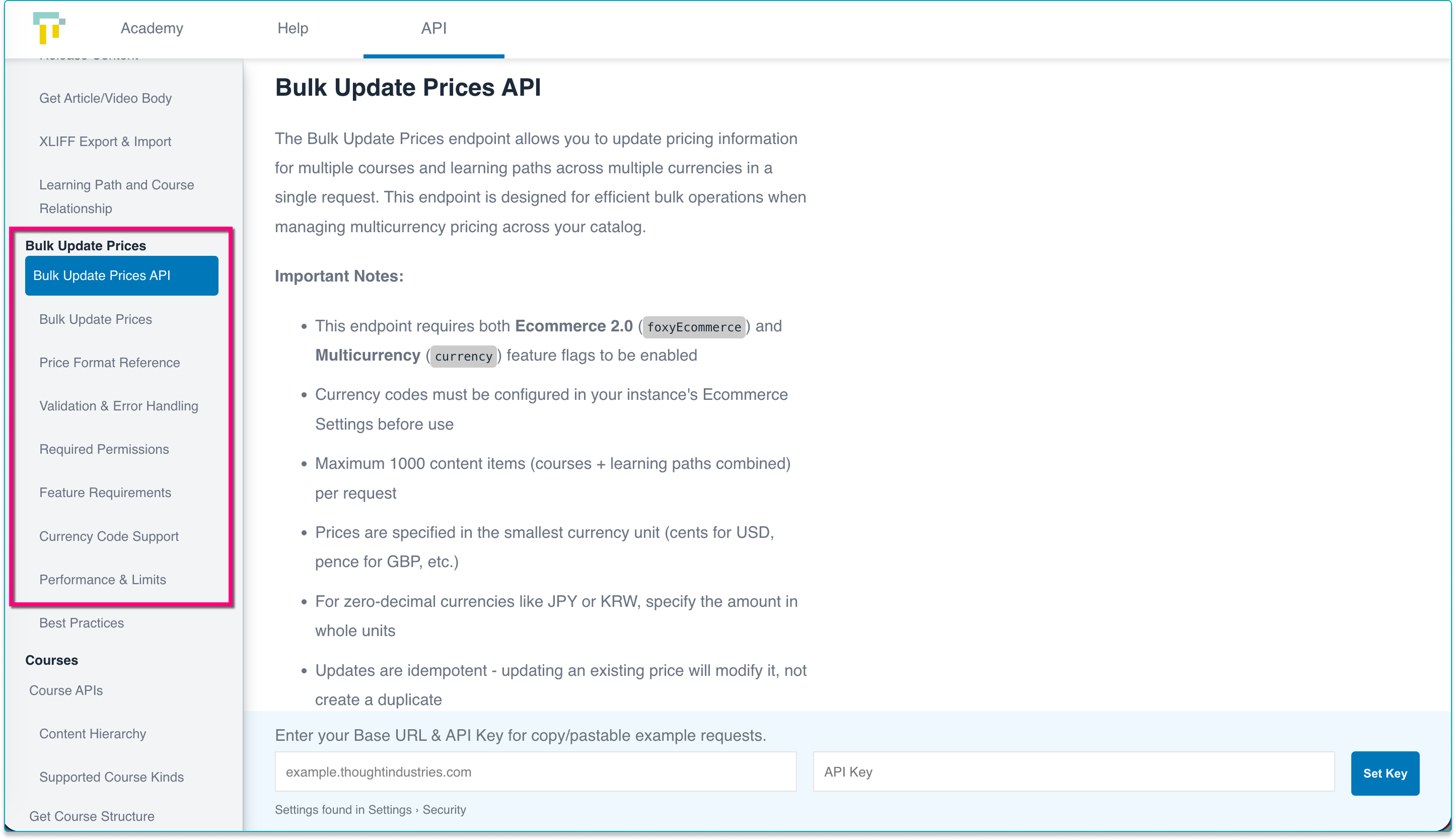
As ecommerce programs scale, especially across regions, currencies, and pricing models, updating prices manually can become time-consuming and error-prone. The Bulk Update Prices API extends our ecommerce and content APIs to make large-scale price management faster, more consistent, and easier to automate.
This endpoint is particularly useful for scenarios like rolling out global price changes, managing currency-specific pricing, or syncing prices from external systems across large catalogs. It builds on our recent investments in ecommerce flexibility and API-driven operations, giving teams greater control over pricing as their programs and markets grow.
For full details and examples, see the API documentation.
Return 404 on Archived Sessions
Archived session URLs will now return a 404 status code instead of a success response when the session is no longer available. This enables customers to reliably detect archived sessions and automate learner redirection to the appropriate active content.
Adjust aspect ratio for Synthesia videos
Improved Synthesia video aspect ratio handling for more consistent playback in production.
We released fixes for the following:
- TI native course page displays unexpectedly when accessing SCORM content inside a learning path
January 7th, 2026
📣 From the CPO
Sarah Phoenix, our new Chief Product Officer, shares why this release matters and how it reflects our product vision moving forward.
This release continues our focus on strengthening the platform foundations our customers rely on as your learning programs scale, particularly in data transparency and governance, ecommerce flexibility, and platform extensibility. Several of these updates represent early steps in larger initiatives we’ll continue to build on in the coming quarters.
Read More Here ↓
Stronger Reporting, Transparency, and Administrative Control
Reporting and governance remain a key focus area. This release expands administrative visibility and control over critical data flows via improved management of scheduled reports. These improvements reinforce our commitment to data access and transparency and represent foundational work toward broader reporting enhancements planned for later this year.
Clearer, More Scalable Monetization and Ecommerce Experiences
This release advances our ecommerce strategy by making it easier for organizations to operate globally, choose the right ecommerce model for their business, and confidently manage revenue-driving workflows. Enhancements to global and multicurrency ecommerce, clearer guidance on ecommerce options, and continued improvements to discount and checkout tooling help teams deliver more consistent buying experiences as they expand across regions and use cases. These updates reflect a broader, ongoing investment in flexible, enterprise-ready ecommerce.
Extensibility for Modern Learning Platforms
We’re continuing to invest in extensibility across the platform to help customers adapt TI to their unique environments and workflows. The new Synthesia integration enables teams to embed high-quality, AI-generated videos directly into their courses, making it easier to scale video-first learning without the overhead of traditional production workflows. By supporting dynamic capabilities like automated translation and ongoing updates through the full Synthesia video player, this integration lays the groundwork for richer, more accessible learning experiences as expectations for video content continue to grow.
INTEGRATIONS
Synthesia Integration
Modern learners increasingly expect engaging, video-first learning experiences, often delivered in their preferred language and kept current as products and processes evolve. At the same time, traditional video production can be expensive, time-consuming, and difficult to scale, making it challenging for teams to meet those expectations consistently.
Our new integration with Synthesia helps close that gap by enabling organizations to embed high-quality, AI-generated videos directly into Thought Industries courses. Customers with a Synthesia account create and manage videos in Synthesia, then add them to TI as video pages or standalone video assets by simply specifying the Synthesia video ID, similar to how Wistia videos can be added today. Videos are embedded using the full Synthesia video player, allowing learners to benefit from capabilities like automated translation and seamless updates without re-exporting or re-uploading content.
Tip
Read up about the integration in the help article here.
Why this Matters
For learners, this means more engaging, accessible, and consistently up-to-date video content. For admins and content creators, it enables faster production, easier localization, and simpler ongoing maintenance, making it possible to scale modern, video-driven learning experiences without the overhead of traditional video workflows.
Note
Synthesia doesn’t currently support tracking progress or completion so completion criteria are not yet available for Synthesia videos but we’re working to develop that functionality ASAP.
We released the following quality improvements:
Scheduled Reports Manager: Expanded Visibility and Control
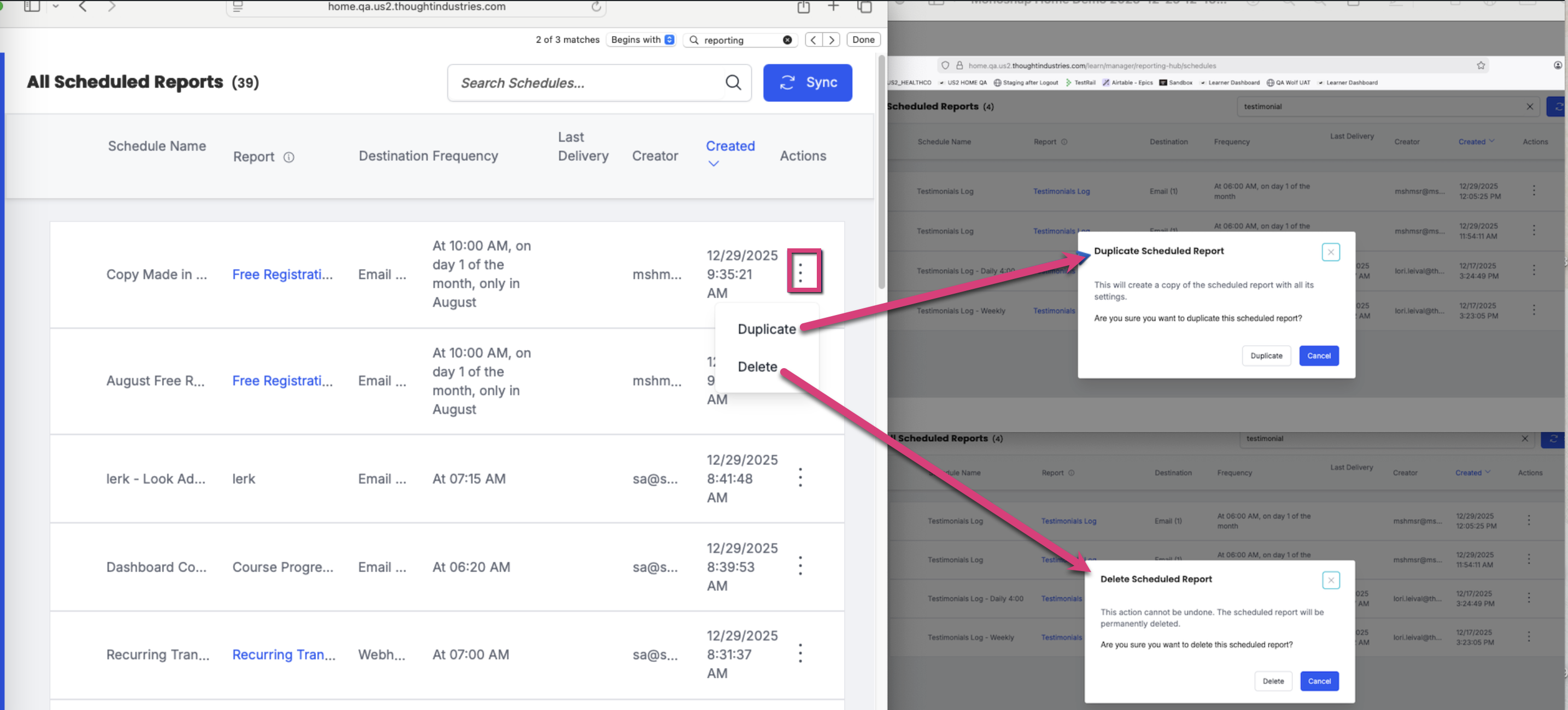
Scheduled reports play a critical role in how you communicate the value of your learning programs, whether that’s keeping internal stakeholders aligned, sharing outcomes with customers and partners, or monitoring program health over time. As reporting becomes more central to decision-making, it’s essential that teams can easily understand, manage, and govern how that data is shared.
Building on the initial release of the Scheduled Reports Manager, this next phase adds filtering and sorting to help admins quickly find and review scheduled reports, along with duplicate and delete actions to make ongoing management more efficient. These enhancements give teams greater confidence and control as reporting needs evolve across different audiences and use cases.
This release is part of a broader investment in foundational data transparency, usability, and accuracy across the platform. We’ll continue to build on this foundation with additional capabilities to further streamline reporting workflows and improve how data supports customer communication and decision-making.
You can access the Scheduled Reports Manager from your Admin Homepage under Reports > Schedules.
Tip
Head on over to this article for more information on Sending & Scheduling reports.
Global Ecommerce & Clearer Ecommerce Options
Selling learning online looks very different depending on your business model and becomes more complex as you expand into new regions. This release strengthens our ecommerce capabilities to support a wider range of use cases, from simple monetization to global, multicurrency commerce, while making it easier to choose and implement the right ecommerce approach for your needs.
We’ve rounded out our global ecommerce functionality and introduced clearer guidance across our ecommerce options, giving teams more confidence as they launch, scale, and evolve their ecommerce strategy.
-
Global, Multicurrency Ecommerce: Your customers can now purchase training in their local currency and language, creating a more consistent and trustworthy buying experience across regions. With this release, we now support multicurrency and multilingual pricing and checkout, enabling organizations to operate ecommerce across multiple markets without fragmenting the buyer experience.
Read more about Multicurrency here. - Clearer Ecommerce Guidance: Choosing the right ecommerce setup shouldn’t be guesswork. We’ve added a new centralized ecommerce overview that provides a clear starting point for understanding our ecommerce options and how they align to different use cases. This guidance complements our existing support articles and will continue to expand over time, helping teams implement ecommerce more effectively and adapt as their needs grow.
Note
Enabling the checkout translations functionality for the New Ecommerce Engine and Multicurrency requires a one-time effort to enable the feature and ensure any existing checkout translation strings are surfaced. Our technical teams will be reaching out to coordinate this enablement with any customers using the New Ecommerce Engine.
Mandating Periodic Manager Password Resets
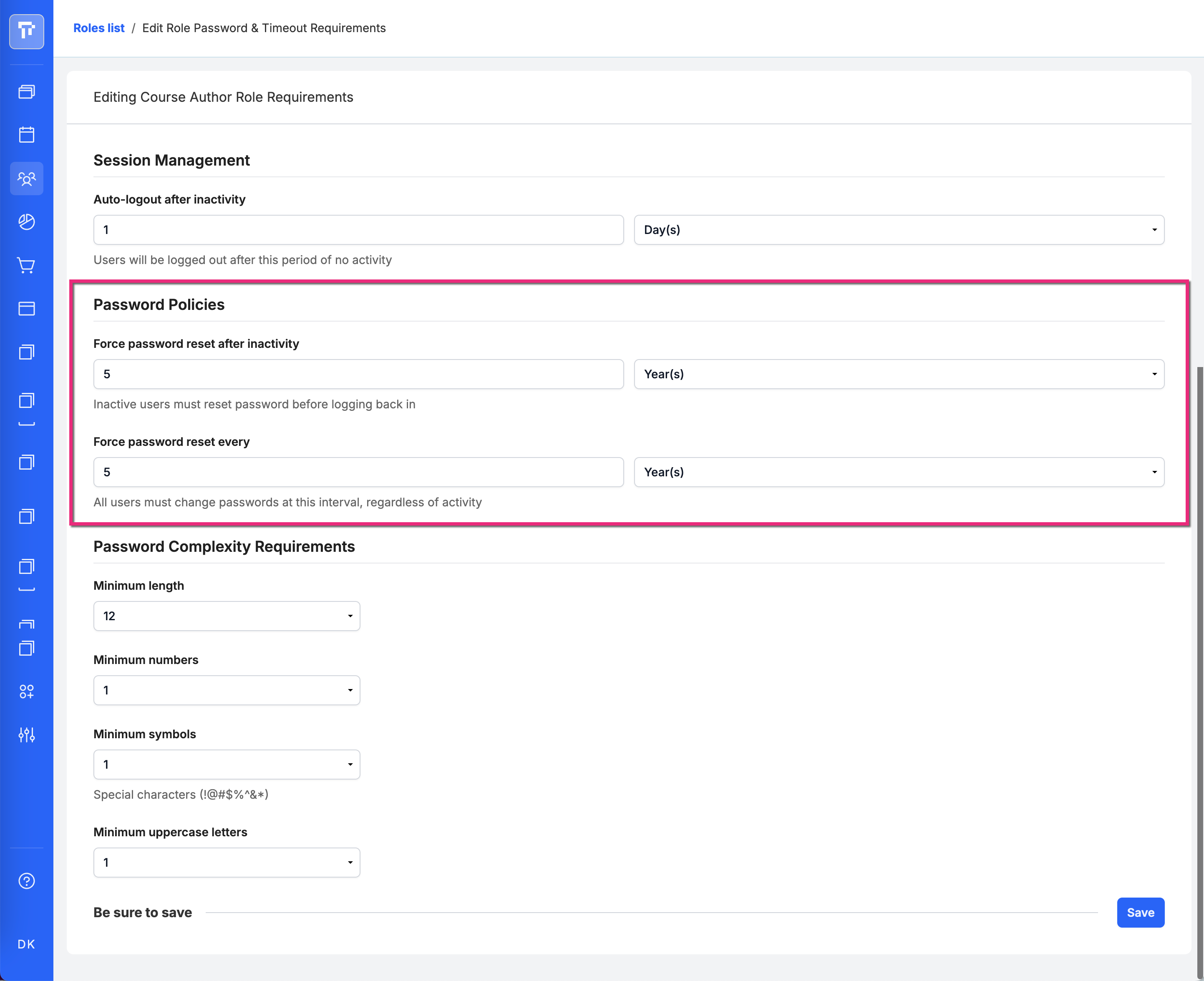
Maintaining strong access controls is critical for protecting sensitive data and meeting security and compliance requirements. This update gives organizations greater confidence that privileged admin accounts remain secure over time, regardless of how frequently individual users log in.
With this release, you can now require admin and manager users to reset their passwords on a fixed, calendar-based schedule, in addition to existing inactivity-based controls. This enables consistent password rotation policies that align with organizational standards and security best practices.
To support clarity and ease of use, we’ve added a new fixed-period password reset setting and updated existing labels to clearly distinguish between time-based and inactivity-based requirements, allowing teams to apply the right level of protection based on access and responsibility.
To configure these settings:
- Navigate to Users > Managers.
- Select a role from the list.
- Click the gear menu to select Edit Role Requirements.
- Both settings default to 5 years.
We released fixes for the following:
- When already enrolled in a non-primary session, clicking on Enroll Now on Detail Page also enrolls the learner in the primary session
- Problem Editing Reporting Permissions for Custom Admin Roles
- Learner is enrolled in in-progress events when they click on the Catalog
- Multiple Choice & Multiple Answer Questions Show Correct Answers on Failure Despite “Only Show Correct Answers After Passing” Setting
- Certificate Expiration reminder emails prompting learners to recertify issue for archived content
- joinUrl token not rendering in campaign emails triggered by "X days before content start date"
- Webinar's Completion tab not loading at all for admins
- Bulk Importing VILT Sessions is not working
- Learner notifications sorted by ID, Instead Sort by Created Date